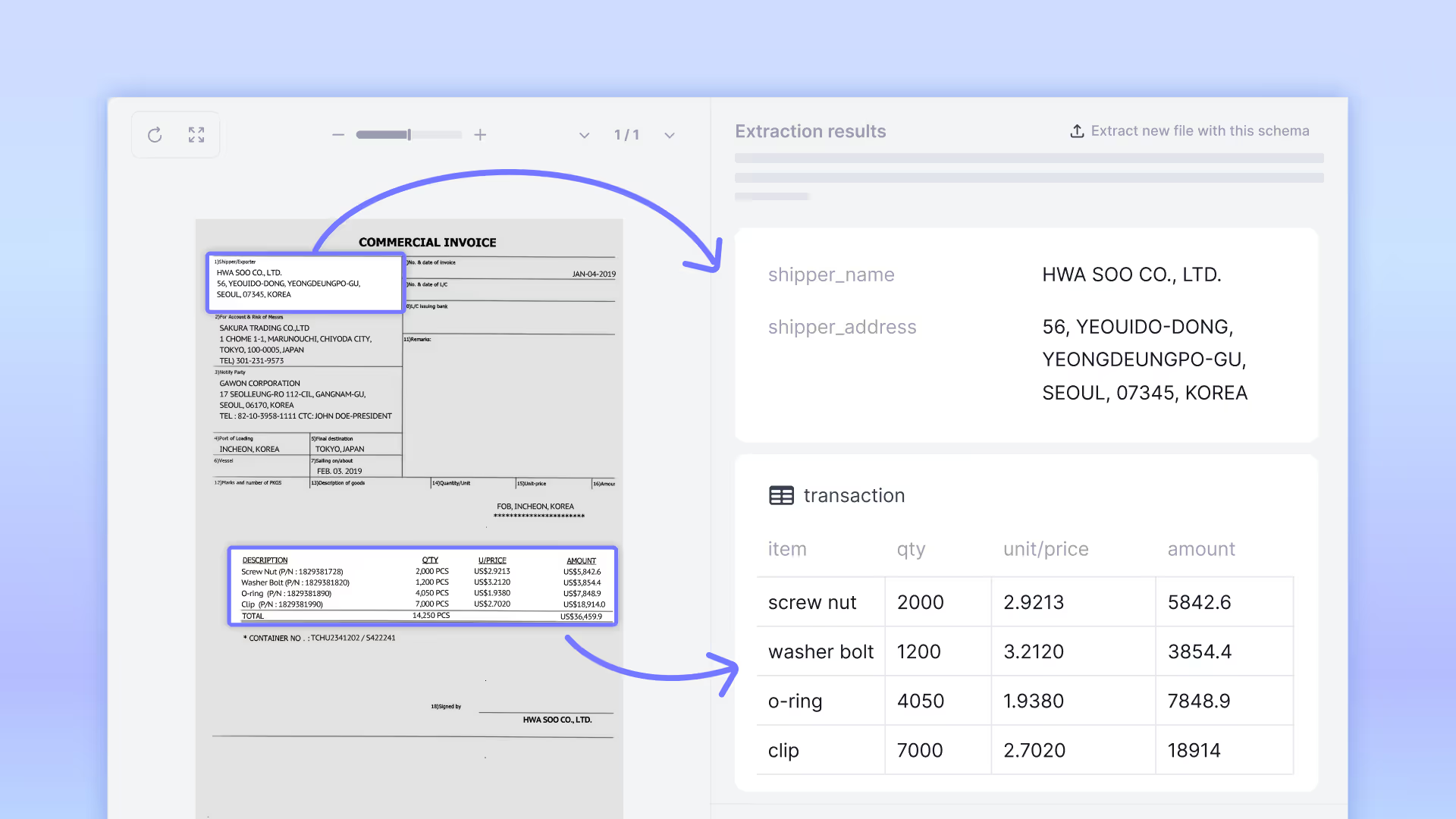
Upstage is introducing Document Parse Enhanced, a new processing mode in Document Parse that extends standard parsing with direct understanding of visual document elements. This enables reliable extraction of complex tables, checkboxes, charts, and diagrams that previous text-based approaches cannot handle consistently.

Best-in-class intelligence for complex document elements

Most document parsing systems focus primarily on structured text, which creates clear limitations when documents rely on visual structure rather than explicit formatting.

Document Parse Enhanced mode leverages VLMs to remove these limitations and accurately understand:

  • Complex tables — including multi-line cells, line-less tables, and multi-page tables
  • Charts — converted into structured data and natural-language explanations
  • Images and diagrams — summarized into concise, machine-readable descriptions
  • Checkboxes — reliably detected with checked / unchecked status

These capabilities are available as part of Document Parse, allowing teams to work with irregular and visually complex documents in a clean, machine-ready form. See how complex tables and charts are parsed in the Document Parse Playground.

How Document Parse Enhanced mode works

Document Parse Enhanced mode builds on two core strengths of Document Parse—high OCR accuracy and reliable visual grounding—and extends them by applying vision language model to complex visual elements.

This allows Enhanced mode to understand how visual components relate to each other within the document layout, rather than treating them as isolated regions.

As a result, the system can:

  • Recognize complex and line-less tables across pages
  • Convert charts into structured values along with a narrative explanation
  • Summarize images and diagrams so LLMs and downstream systems can understand their meaning
  • Detect checkboxes and accurately recognize their checked or unchecked state

Performance benchmark: accuracy where document workflows matter

The tables below summarize performance on Upstage’s internal dpp-bench-v1.4.0 benchmarks.

Rather than optimizing for isolated single-image tasks, Document Parse Enhanced mode is designed to balance structural accuracy, consistency, and latency—the combination that matters most in document-heavy workflows.

1. Complex table structure recognition

Complex tables are one of the most common and most challenging elements in enterprise documents. They often span multiple pages, lack explicit grid lines, and rely on visual alignment rather than strict structure.
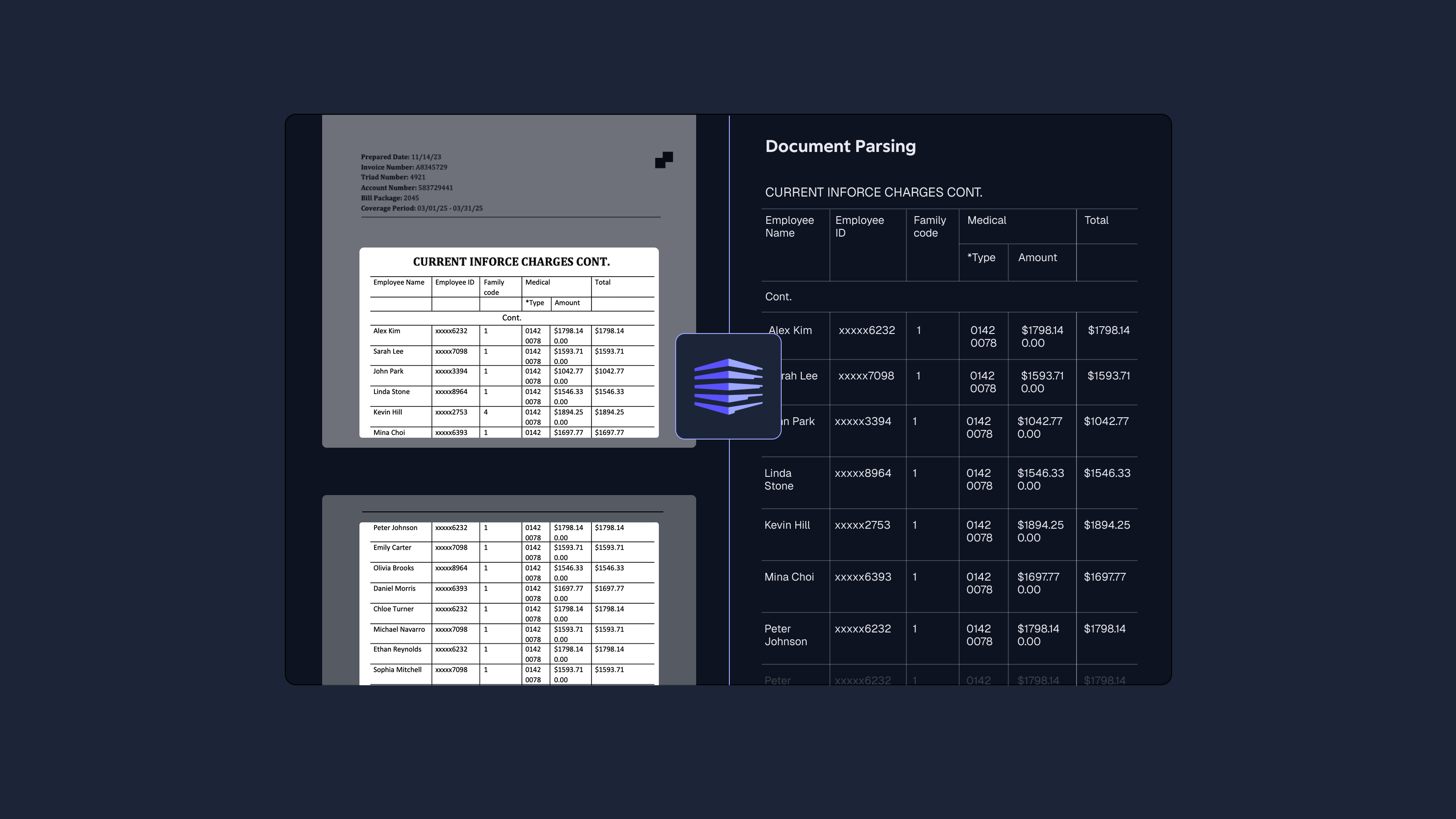
On the table benchmark, Enhanced mode shows a clear improvement over standard parsing approaches, while maintaining practical latency for production use.

Dataset: dpp-bench-v1.4.0/table

In particular:

  • Table structure accuracy (TEDS-S) improves significantly over standard mode
  • Latency remains within practical bounds for large-scale document processing, unlike general-purpose multimodal models

2. Multi-page table reconstruction
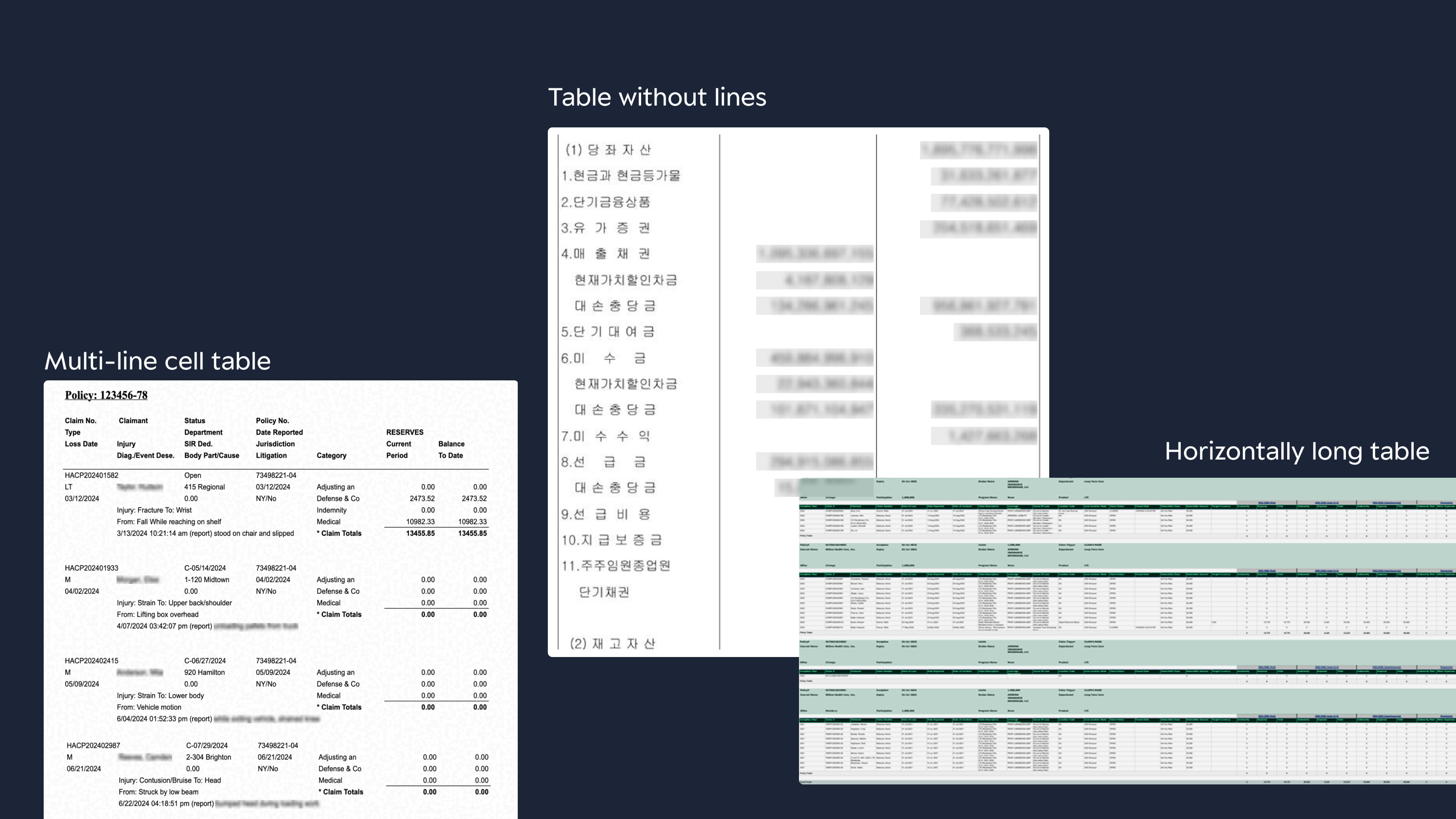
For multi-page tables, accuracy alone is not enough. What matters is whether the model can reliably merge multi-page tables at scale without introducing latency bottlenecks.

Dataset: dpp-bench-v1.4.0/table

While multiple models achieve strong merge accuracy, Document Parse Enhanced mode delivers comparable results at substantially lower latency, making it better suited for document workflows where hundreds or thousands of pages are processed continuously.

3. Chart and image understanding
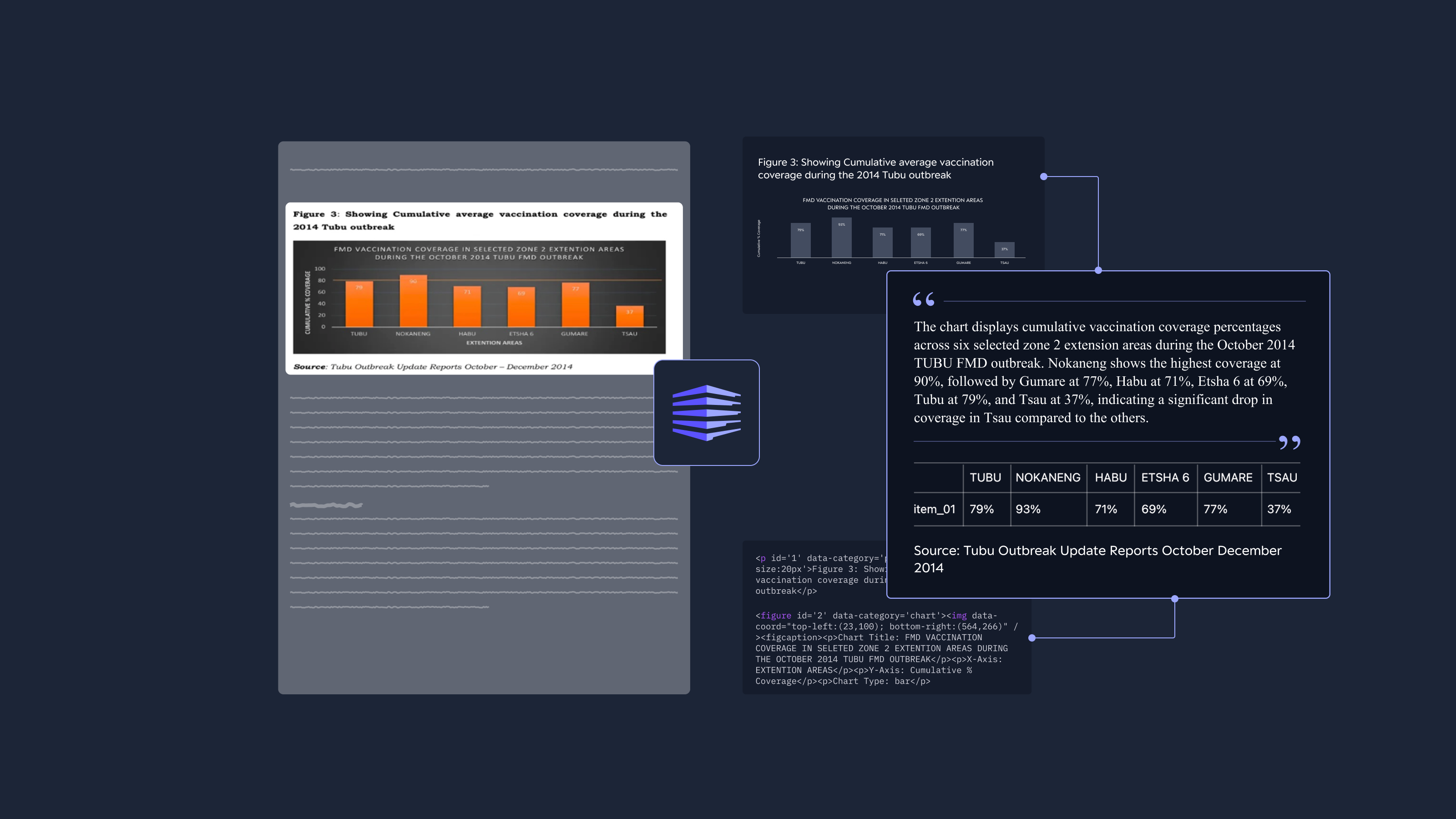
"<header id='0' style='font-size:18px'>Performance Audit Report on the Control of FMD</header>

<figure id='2' data-category='chart'><img data-coord="top-left:(23,100); bottom-right:(565,266)" /><figure>
  <figurecaption>
    <chart_type>bar chart</chart_type>
    <chart_description>The bar chart displays cumulative vaccination coverage percentages across six selected zone 2 extension areas during the October 2014 TUBU FMD outbreak. Coverage ranges from 37% in TSU to 94% in NOKANENG, with NOKANENG showing the highest coverage and TSU the lowest. The chart compares vaccination progress among these areas, with NOKANENG having the highest cumulative percentage and TSU the lowest.</chart_description>

Beyond extracting raw values, Document Parse Enhanced mode focuses on making visual content usable in downstream automation.

Enhanced mode generates structured representations along with concise natural-language descriptions that capture trends, relationships, and context.

Dataset: dpp-bench-v1.4.0/chart,figure

The ability to generate explanations alongside structured outputs enables visual elements to be searched, summarized, and reasoned over—capabilities that numeric scores alone do not reflect.

Chart and image scores are evaluated by first processing pages containing charts or images with each model, then feeding the recognized content into GPT-4.1 and measuring performance through task-specific questions.

As shown in the table, Enhanced mode achieves comparable understanding performance to recent VLM-based models, while recognizing charts and images with significantly lower latency.

4. Checkbox recognition
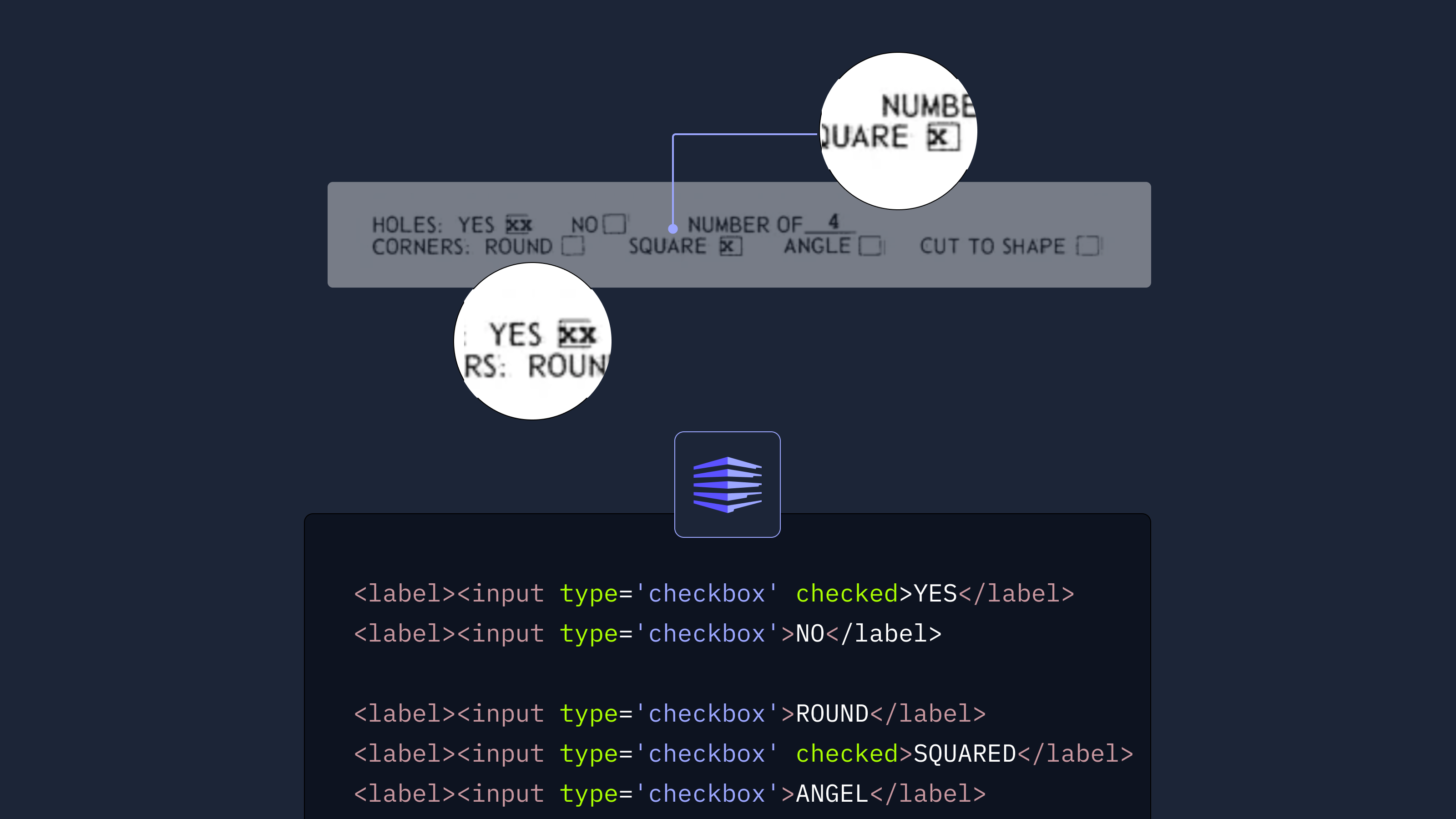
Checkboxes are a small visual element, but a critical one in many forms and applications.
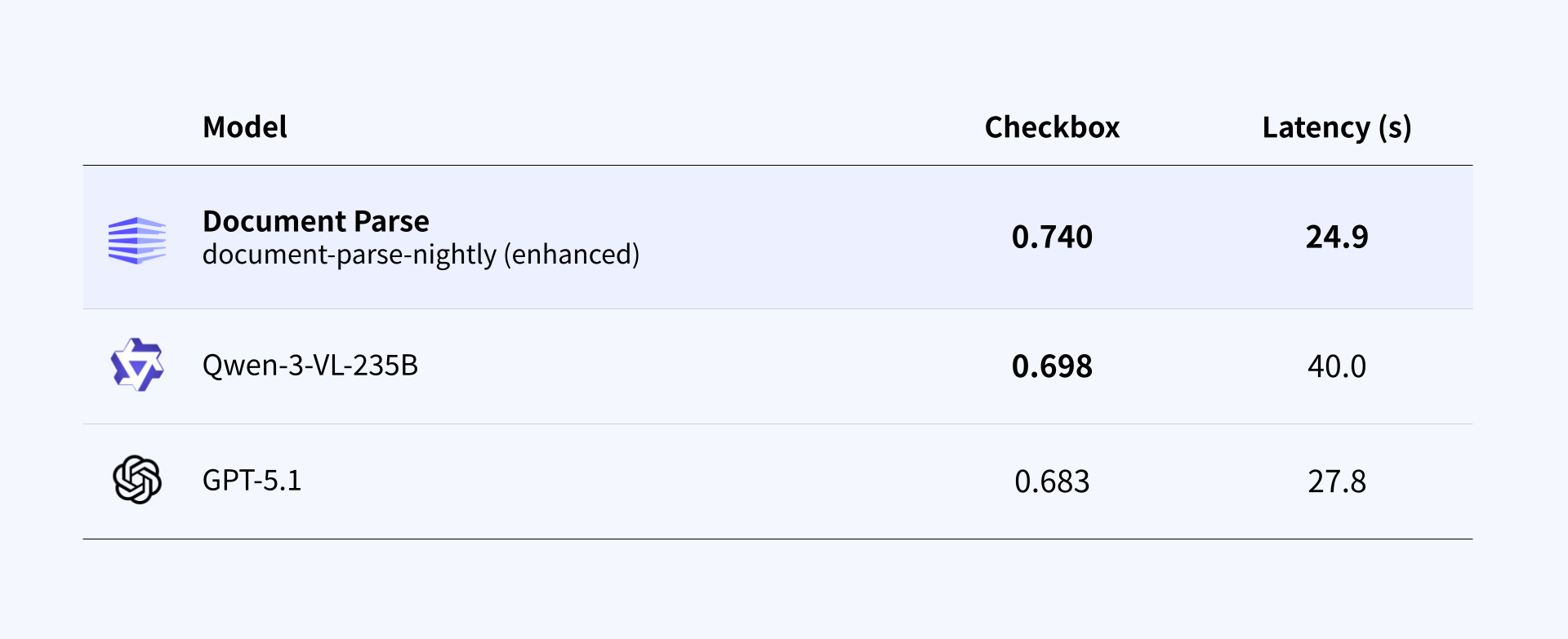
Dataset: dpp-bench-v1.4.0/checkbox

While still an evolving capability, Enhanced mode already shows stronger checkbox accuracy than general-purpose multimodal baselines, with ongoing improvements focused on dense and complex layouts.

Easily apply Enhanced mode to your workflow

Document Parse now supports three processing modes, allowing teams to balance accuracy, speed, and cost:

  1. Standard mode (mode=standard) – For general document parsing tasks.
  2. Enhanced mode (mode=enhanced) – For documents containing complex tables, charts, diagrams, and dense visual structures.
  3. Auto mode (mode=auto) – Automatically analyzes each page and routes it to Standard or Enhanced mode depending on complexity—maximizing accuracy while optimizing cost.

Example: calling Enhanced mode

curl -X POST \
  -H "Authorization: Bearer <YOUR_API_KEY>" \
  -H "Content-Type: multipart/form-data" \
  -F "document=@./test.pdf" \
  -F "model=document-parse-nightly" \
  -F "mode=enhanced" \
  https://api.upstage.ai/v1/document-digitization

Note: During the beta period, Enhanced mode is available via the document-parse-nightly model.

Shaping the next generation of document workflows

Document Parse Enhanced mode expands what teams can automate with documents today, especially in workflows where complex tables, charts, and images often slow things down. As we continue improving its coverage across more document types and layouts, our goal is to make document-driven workflows easier and more reliable—without changing the way you already work.

If you’d like to see how these results apply to your own documents, you can test Enhanced mode in the Playground.

What’s next

Document Parse Enhanced mode is currently available in beta, with a focus on improving how documents with complex visual elements—such as tables, charts, images, and checkboxes—are handled in real workflows. These areas have consistently been among the most requested by users, and this release establishes a stronger foundation for understanding visually rich document layouts.

Building on this foundation, we are actively expanding coverage to address additional document challenges frequently raised by customers, including handwriting recognition, stamp and signature detection, font style identification, and low-quality scanned documents. These improvements will be introduced progressively through upcoming product updates as they become ready.

Enhanced mode will be available at the same price as the existing Document Parse standard mode through the end of January, making this an ideal time to try it in your workflows and share feedback as the beta continues to evolve.

Learn more

Introducing Document Parse: Enhanced mode

Minjee Kang
Minjee Kang
Announcements
December 17, 2025
Introducing Document Parse: Enhanced mode
Get launch updates + free document credits
Sign up to receive launch notification and credit to process up to 10,000 pages, valid through December.
We build intelligence for the future of work—now it’s your turn.

Start building with our API or talk to our team.

Share

Upstage is introducing Document Parse Enhanced, a new processing mode in Document Parse that extends standard parsing with direct understanding of visual document elements. This enables reliable extraction of complex tables, checkboxes, charts, and diagrams that previous text-based approaches cannot handle consistently.

Best-in-class intelligence for complex document elements

Most document parsing systems focus primarily on structured text, which creates clear limitations when documents rely on visual structure rather than explicit formatting.

Document Parse Enhanced mode leverages VLMs to remove these limitations and accurately understand:

  • Complex tables — including multi-line cells, line-less tables, and multi-page tables
  • Charts — converted into structured data and natural-language explanations
  • Images and diagrams — summarized into concise, machine-readable descriptions
  • Checkboxes — reliably detected with checked / unchecked status

These capabilities are available as part of Document Parse, allowing teams to work with irregular and visually complex documents in a clean, machine-ready form. See how complex tables and charts are parsed in the Document Parse Playground.

How Document Parse Enhanced mode works

Document Parse Enhanced mode builds on two core strengths of Document Parse—high OCR accuracy and reliable visual grounding—and extends them by applying vision language model to complex visual elements.

This allows Enhanced mode to understand how visual components relate to each other within the document layout, rather than treating them as isolated regions.

As a result, the system can:

  • Recognize complex and line-less tables across pages
  • Convert charts into structured values along with a narrative explanation
  • Summarize images and diagrams so LLMs and downstream systems can understand their meaning
  • Detect checkboxes and accurately recognize their checked or unchecked state

Performance benchmark: accuracy where document workflows matter

The tables below summarize performance on Upstage’s internal dpp-bench-v1.4.0 benchmarks.

Rather than optimizing for isolated single-image tasks, Document Parse Enhanced mode is designed to balance structural accuracy, consistency, and latency—the combination that matters most in document-heavy workflows.

1. Complex table structure recognition

Complex tables are one of the most common and most challenging elements in enterprise documents. They often span multiple pages, lack explicit grid lines, and rely on visual alignment rather than strict structure.

On the table benchmark, Enhanced mode shows a clear improvement over standard parsing approaches, while maintaining practical latency for production use.

Dataset: dpp-bench-v1.4.0/table

In particular:

  • Table structure accuracy (TEDS-S) improves significantly over standard mode
  • Latency remains within practical bounds for large-scale document processing, unlike general-purpose multimodal models

2. Multi-page table reconstruction

For multi-page tables, accuracy alone is not enough. What matters is whether the model can reliably merge multi-page tables at scale without introducing latency bottlenecks.

Dataset: dpp-bench-v1.4.0/table

While multiple models achieve strong merge accuracy, Document Parse Enhanced mode delivers comparable results at substantially lower latency, making it better suited for document workflows where hundreds or thousands of pages are processed continuously.

3. Chart and image understanding

"<header id='0' style='font-size:18px'>Performance Audit Report on the Control of FMD</header>

<figure id='2' data-category='chart'><img data-coord="top-left:(23,100); bottom-right:(565,266)" /><figure>
  <figurecaption>
    <chart_type>bar chart</chart_type>
    <chart_description>The bar chart displays cumulative vaccination coverage percentages across six selected zone 2 extension areas during the October 2014 TUBU FMD outbreak. Coverage ranges from 37% in TSU to 94% in NOKANENG, with NOKANENG showing the highest coverage and TSU the lowest. The chart compares vaccination progress among these areas, with NOKANENG having the highest cumulative percentage and TSU the lowest.</chart_description>

Beyond extracting raw values, Document Parse Enhanced mode focuses on making visual content usable in downstream automation.

Enhanced mode generates structured representations along with concise natural-language descriptions that capture trends, relationships, and context.

Dataset: dpp-bench-v1.4.0/chart,figure

The ability to generate explanations alongside structured outputs enables visual elements to be searched, summarized, and reasoned over—capabilities that numeric scores alone do not reflect.

Chart and image scores are evaluated by first processing pages containing charts or images with each model, then feeding the recognized content into GPT-4.1 and measuring performance through task-specific questions.

As shown in the table, Enhanced mode achieves comparable understanding performance to recent VLM-based models, while recognizing charts and images with significantly lower latency.

4. Checkbox recognition

Checkboxes are a small visual element, but a critical one in many forms and applications.

Dataset: dpp-bench-v1.4.0/checkbox

While still an evolving capability, Enhanced mode already shows stronger checkbox accuracy than general-purpose multimodal baselines, with ongoing improvements focused on dense and complex layouts.

Easily apply Enhanced mode to your workflow

Document Parse now supports three processing modes, allowing teams to balance accuracy, speed, and cost:

  1. Standard mode (mode=standard) – For general document parsing tasks.
  2. Enhanced mode (mode=enhanced) – For documents containing complex tables, charts, diagrams, and dense visual structures.
  3. Auto mode (mode=auto) – Automatically analyzes each page and routes it to Standard or Enhanced mode depending on complexity—maximizing accuracy while optimizing cost.

Example: calling Enhanced mode

curl -X POST \
  -H "Authorization: Bearer <YOUR_API_KEY>" \
  -H "Content-Type: multipart/form-data" \
  -F "document=@./test.pdf" \
  -F "model=document-parse-nightly" \
  -F "mode=enhanced" \
  https://api.upstage.ai/v1/document-digitization

Note: During the beta period, Enhanced mode is available via the document-parse-nightly model.

Shaping the next generation of document workflows

Document Parse Enhanced mode expands what teams can automate with documents today, especially in workflows where complex tables, charts, and images often slow things down. As we continue improving its coverage across more document types and layouts, our goal is to make document-driven workflows easier and more reliable—without changing the way you already work.

If you’d like to see how these results apply to your own documents, you can test Enhanced mode in the Playground.

What’s next

Document Parse Enhanced mode is currently available in beta, with a focus on improving how documents with complex visual elements—such as tables, charts, images, and checkboxes—are handled in real workflows. These areas have consistently been among the most requested by users, and this release establishes a stronger foundation for understanding visually rich document layouts.

Building on this foundation, we are actively expanding coverage to address additional document challenges frequently raised by customers, including handwriting recognition, stamp and signature detection, font style identification, and low-quality scanned documents. These improvements will be introduced progressively through upcoming product updates as they become ready.

Enhanced mode will be available at the same price as the existing Document Parse standard mode through the end of January, making this an ideal time to try it in your workflows and share feedback as the beta continues to evolve.

Learn more

Upstage is introducing Document Parse Enhanced, a new processing mode in Document Parse that extends standard parsing with direct understanding of visual document elements. This enables reliable extraction of complex tables, checkboxes, charts, and diagrams that previous text-based approaches cannot handle consistently.

Best-in-class intelligence for complex document elements

Most document parsing systems focus primarily on structured text, which creates clear limitations when documents rely on visual structure rather than explicit formatting.

Document Parse Enhanced mode leverages VLMs to remove these limitations and accurately understand:

  • Complex tables — including multi-line cells, line-less tables, and multi-page tables
  • Charts — converted into structured data and natural-language explanations
  • Images and diagrams — summarized into concise, machine-readable descriptions
  • Checkboxes — reliably detected with checked / unchecked status

These capabilities are available as part of Document Parse, allowing teams to work with irregular and visually complex documents in a clean, machine-ready form. See how complex tables and charts are parsed in the Document Parse Playground.

How Document Parse Enhanced mode works

Document Parse Enhanced mode builds on two core strengths of Document Parse—high OCR accuracy and reliable visual grounding—and extends them by applying vision language model to complex visual elements.

This allows Enhanced mode to understand how visual components relate to each other within the document layout, rather than treating them as isolated regions.

As a result, the system can:

  • Recognize complex and line-less tables across pages
  • Convert charts into structured values along with a narrative explanation
  • Summarize images and diagrams so LLMs and downstream systems can understand their meaning
  • Detect checkboxes and accurately recognize their checked or unchecked state

Performance benchmark: accuracy where document workflows matter

The tables below summarize performance on Upstage’s internal dpp-bench-v1.4.0 benchmarks.

Rather than optimizing for isolated single-image tasks, Document Parse Enhanced mode is designed to balance structural accuracy, consistency, and latency—the combination that matters most in document-heavy workflows.

1. Complex table structure recognition

Complex tables are one of the most common and most challenging elements in enterprise documents. They often span multiple pages, lack explicit grid lines, and rely on visual alignment rather than strict structure.

On the table benchmark, Enhanced mode shows a clear improvement over standard parsing approaches, while maintaining practical latency for production use.

Dataset: dpp-bench-v1.4.0/table

In particular:

  • Table structure accuracy (TEDS-S) improves significantly over standard mode
  • Latency remains within practical bounds for large-scale document processing, unlike general-purpose multimodal models

2. Multi-page table reconstruction

For multi-page tables, accuracy alone is not enough. What matters is whether the model can reliably merge multi-page tables at scale without introducing latency bottlenecks.

Dataset: dpp-bench-v1.4.0/table

While multiple models achieve strong merge accuracy, Document Parse Enhanced mode delivers comparable results at substantially lower latency, making it better suited for document workflows where hundreds or thousands of pages are processed continuously.

3. Chart and image understanding

"<header id='0' style='font-size:18px'>Performance Audit Report on the Control of FMD</header>

<figure id='2' data-category='chart'><img data-coord="top-left:(23,100); bottom-right:(565,266)" /><figure>
  <figurecaption>
    <chart_type>bar chart</chart_type>
    <chart_description>The bar chart displays cumulative vaccination coverage percentages across six selected zone 2 extension areas during the October 2014 TUBU FMD outbreak. Coverage ranges from 37% in TSU to 94% in NOKANENG, with NOKANENG showing the highest coverage and TSU the lowest. The chart compares vaccination progress among these areas, with NOKANENG having the highest cumulative percentage and TSU the lowest.</chart_description>

Beyond extracting raw values, Document Parse Enhanced mode focuses on making visual content usable in downstream automation.

Enhanced mode generates structured representations along with concise natural-language descriptions that capture trends, relationships, and context.

Dataset: dpp-bench-v1.4.0/chart,figure

The ability to generate explanations alongside structured outputs enables visual elements to be searched, summarized, and reasoned over—capabilities that numeric scores alone do not reflect.

Chart and image scores are evaluated by first processing pages containing charts or images with each model, then feeding the recognized content into GPT-4.1 and measuring performance through task-specific questions.

As shown in the table, Enhanced mode achieves comparable understanding performance to recent VLM-based models, while recognizing charts and images with significantly lower latency.

4. Checkbox recognition

Checkboxes are a small visual element, but a critical one in many forms and applications.

Dataset: dpp-bench-v1.4.0/checkbox

While still an evolving capability, Enhanced mode already shows stronger checkbox accuracy than general-purpose multimodal baselines, with ongoing improvements focused on dense and complex layouts.

Easily apply Enhanced mode to your workflow

Document Parse now supports three processing modes, allowing teams to balance accuracy, speed, and cost:

  1. Standard mode (mode=standard) – For general document parsing tasks.
  2. Enhanced mode (mode=enhanced) – For documents containing complex tables, charts, diagrams, and dense visual structures.
  3. Auto mode (mode=auto) – Automatically analyzes each page and routes it to Standard or Enhanced mode depending on complexity—maximizing accuracy while optimizing cost.

Example: calling Enhanced mode

curl -X POST \
  -H "Authorization: Bearer <YOUR_API_KEY>" \
  -H "Content-Type: multipart/form-data" \
  -F "document=@./test.pdf" \
  -F "model=document-parse-nightly" \
  -F "mode=enhanced" \
  https://api.upstage.ai/v1/document-digitization

Note: During the beta period, Enhanced mode is available via the document-parse-nightly model.

Shaping the next generation of document workflows

Document Parse Enhanced mode expands what teams can automate with documents today, especially in workflows where complex tables, charts, and images often slow things down. As we continue improving its coverage across more document types and layouts, our goal is to make document-driven workflows easier and more reliable—without changing the way you already work.

If you’d like to see how these results apply to your own documents, you can test Enhanced mode in the Playground.

What’s next

Document Parse Enhanced mode is currently available in beta, with a focus on improving how documents with complex visual elements—such as tables, charts, images, and checkboxes—are handled in real workflows. These areas have consistently been among the most requested by users, and this release establishes a stronger foundation for understanding visually rich document layouts.

Building on this foundation, we are actively expanding coverage to address additional document challenges frequently raised by customers, including handwriting recognition, stamp and signature detection, font style identification, and low-quality scanned documents. These improvements will be introduced progressively through upcoming product updates as they become ready.

Enhanced mode will be available at the same price as the existing Document Parse standard mode through the end of January, making this an ideal time to try it in your workflows and share feedback as the beta continues to evolve.

Learn more

The 90-Day path to
Underwriting Reinvention

See how Fortune 500 companies eliminate the bottleneck where 70% of submissions arrive incomplete.
1,000+
Submissions Analyzed
90
Days to Transform

Download the White Paper

Thank you! Your submission has been received!
Oops! Something went wrong while submitting the form.

Make your first API call in 3 minutes.

Open the console and run the Quickstart for chat, extract, and embed

See how AI works on your documents.

Turn documents and data into reliable decisions your team can trust.